


You must have heard a lot these days that many marketers have closed their physical stores and created a page on Instagram. By creating an Instagram store, their customers have multiplied.
Isn’t that exciting?
It will become more exciting if you know that according to published articles, Instagram users have risen to more than 1.28 billion users this year, exceeding last year by about 100 million users, with expectations that they will rise up to 1.4 billion in the coming years. According to a study conducted by Instagram, 44% of users make weekly purchases on Instagram.
When we look at these statistics, we realize that online stores and Instagram stores owe their prosperity to the spread of Covid-19 and the quarantines that come with it. However, no one can ignore the profit and income that can be achieved this way.
The rapid increase in the number of Instagram users and the purchases they make through this network is a wonderful opportunity to invest in the field of sales through this social network.
In this post, we will guide you how to take online orders from your customers, whether through your Instagram store or anywhere else in the virtual world, and how to multiply your income and profits by using the online order form.
How to make an Instagram store?
Many people ask various questions about this topic through the Internet, including, can I open a free online store? Is it possible to earn money online for free? And many other questions. The answer lies in creating an Instagram store.
Creating an Instagram store is very easy. To create your account, all you have to do is to install Instagram application on your smart device and then register in it. After registering and completing your profile information, you must change your account to a Business Account.
Another attractive advantage that may be more useful for you is to convert your account into a Creator Account. In the image below, you can see the differences between Instagram Business Account and Creator Account.
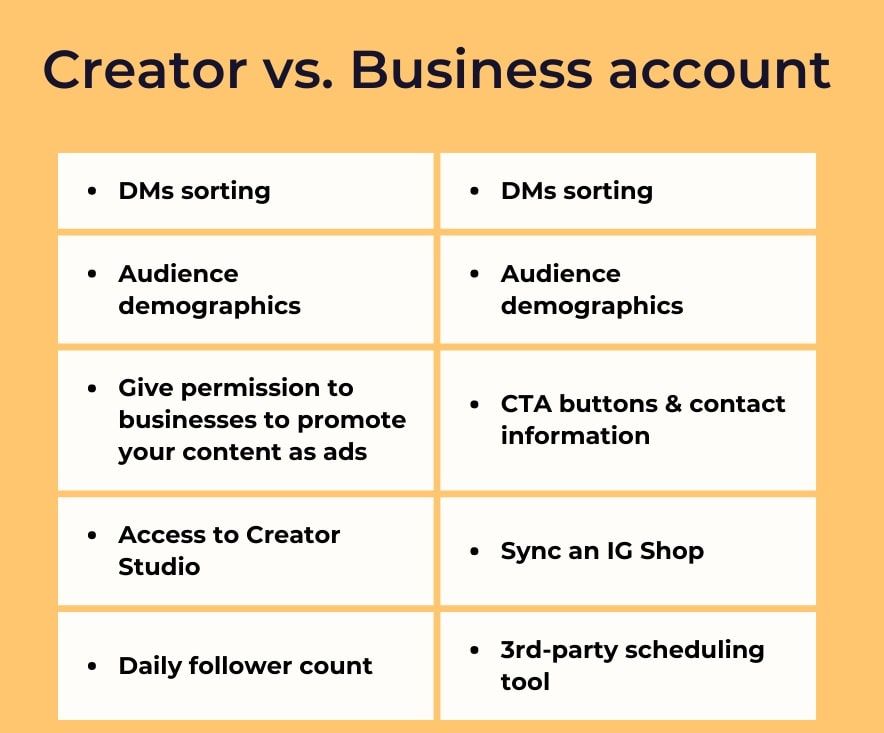
Converting a personal account to a business account on Instagram is not that difficult. By doing so, you can benefit from the features offered by business account. For example, you can schedule your posts on Meta for free and post them automatically.
One of the problems that small and family businesses encounter on Instagram is that they don’t have time to respond to messages and receive orders. But on the other hand, they want to concentrate on the customers’ service and on satisfying them.
After converting your account to a business account, you should now use these special features of Instagram for business accounts in order to appear more professional to your users. In addition to attracting their attention, you can also follow the principles of customer service and increase the number of your customers every day by doing the following:
- Connect your Instagram page to your WhatsApp Business account so that potential customers can communicate with you more easily.
- Use reels to increase your view rate.
- Use a variety of online forms to communicate with your customers. Forms such as placing orders, complaints, suggestions and survey form play a very important role in enhancing the customer experience.
Steps of having an online order from your Instagram store without having a website
One of the most important concerns of Instagram stores is how they show their products to customers and receive their orders.
Usually, Instagram users send direct messages. Answering direct messages on time is not an easy task. You need at least one employee to answer customers’ massages quickly.
If you calculate the costs of hiring an employee to manage your Instagram page, you will find that you have to spend a large amount annually to be able to receive orders and handle them.
On the other hand, the cost of creating a website and uploading content may neither be practical nor financially justified for small businesses and startups.
If you put all these things together, you will find that you have to think about a third solution that is at the same time much less costy, very convenient and practical.
Using the tools offered by Porsline, you can easily create an online order form, place your products on it, get information about your audience and show the relevant products based on their needs. After a customer has put and order, you can get the order fee from the customer and deliver it.
This way, at a very low cost, you will have an elegant form with a simple and beautiful user interface that will help you save time and money.
The steps of creating an order form to facilitate sales through Instagram can be summarized in these few steps:
The first step: Register on Porsline for free
First of all, you need to register on Porsline. After registering, you can create your form for free, use the free features of Porsline, and add your form to your personal information (Bio) on Instagram. You can also send the link to the customers who want to place orders.
The second step: Create the order form
Creating an online order form on Porsline is very simple. You can edit the ready-made form template in the user panel or create a new form from scratch. To create a form, it is better to first ask the user to enter his/her information, and your products will show to him/her based on the specifications he/she likes.
Furthermore, you can use the picture multiple choice question and put up to 40 products with their specifications on your form.
For example, have a look at this ready-made form template. This form is an online order form. By setting up a notification email, you will receive an email immediately once an order is placed so that you can deliver the orders to the customers within the shortest possible time.
Note that you have to upgrade your account if you need advanced features such as adding logic to the questions.
The third step: Set up the order form
At this step, you can use various settings to simplify your work. For example, you can activate email or SMS notification so that you can immediately be notified when you receive a new order to be able to handle it quickly.
Note: If you have a WordPress site, you can also install Porsline WordPress plugin on your site to create Porsline forms and place your order form on your site.
The fourth step: Design the form based on brand criteria
In Porsline, you can design your own form to fit the visual identity of your brand. For example, put your logo on your form or use a background and color scheme suitable for your brand.
The fifth step: Share the order form and receive the orders
At this step, you can share your form on your social media networks or send the link to others. For example, put your product picture in the Story feature of social media networks and encourage users to place their orders with the help of the link of the order form.
The sixth step: Reports
At the final step, after receiving the orders, you will have organized and arranged reports that contain your customers’ information. You can use this information in different advertising campaigns for offering discounts, competing, or attracting more customers. You can also calculate your monthly income by filtering the results.
Other advanced reports, such as customer gender chart, age chart and table of names and information, will help you understand the demographics of your users.
Now you can easily let your customers to shop online by creating an Instagram store, facilitating placing orders, and increasing your income.
Conclusion
You can get more sales by different means. One of the means you should use these days to increase your sales is to create an online store and sell through Instagram. At the same time, you should use your own unique style to attract users to your brand. Traditional methods and copying from others will not improve your Instagram store. The more you can make it easier for customers to place their orders, the more you will take a step to success.
Using Instagram features on the one hand and using the features of software such as Porsline on the other hand will help you be unique and improve on Instagram quickly.