Patients tell you what matters; a good patient satisfaction survey template makes it measurable.
Build and customize this survey directly in Porsline to collect feedback, track results, and improve care quality in real time.
Two minutes with the right template beats weeks of guesswork. In fast-moving clinics and hospitals, a focused patient satisfaction survey template helps you hear patterns early and fix what matters first.
Imagine a 6-doctor family clinic: front-desk delays spike after 5 p.m., while phone follow-ups score well. With a tight question set and clean scales, the team sees wait-time as the top driver of low overall satisfaction—so they add an after-hours check-in lane and a callback option. Scores recover within a month, and complaints drop because the bottleneck was visible and actionable.
What you’ll get here: a practical definition, when to use this survey vs. patient-experience tools, ready-to-use question blocks, and a step-by-step build in Porsline (logic, routing, dashboards). You’ll move from raw comments to clear priorities - without drowning in admin.
What is a Patient Satisfaction Survey?
A patient satisfaction survey is a structured questionnaire used to measure how patients perceive the quality of care and services they receive in a healthcare facility. It focuses on their overall experience—from appointment scheduling and waiting time to communication, respect, and follow-up.
How it differs from “patient experience”:
Satisfaction asks, “Did this meet my expectations?” (perception vs. expectations).
Experience records what actually happened (e.g., “Was discharge info explained?”).
Use both when you can: experience pinpoints events; satisfaction captures how those events land with patients.
Core components
Scales: 5-point Likert for comparability, plus a top-box view (“% of Excellent/Very good”).
Moments of care: check-in, waiting, consultation, tests/procedures, discharge/follow-up.
Communication & empathy: clarity, listening, shared decisions.
Access & logistics: scheduling, wayfinding, digital touchpoints, payment clarity.
Open text: one “What should we improve first?” prompt to surface priorities.
Privacy basics: inform respondents why you’re collecting data and how it’s protected (HIPAA/GDPR principles where applicable), and limit access to results on a need-to-know basis.
When to deploy
Post-visit (48–72h): fresh memory, higher response quality.
Periodic pulse (monthly/quarterly): trend lines for service lines/locations.
Targeted audits: after a change (new triage process, new portal rollout).
Satisfaction surveys translate feelings into signals you can trend and act on.
Why use a Patient Satisfaction Survey?
A patient satisfaction survey helps clinics and hospitals see care through the patient’s eyes—beyond charts and KPIs. It turns assumptions about “good service” into measurable data that teams can act on.
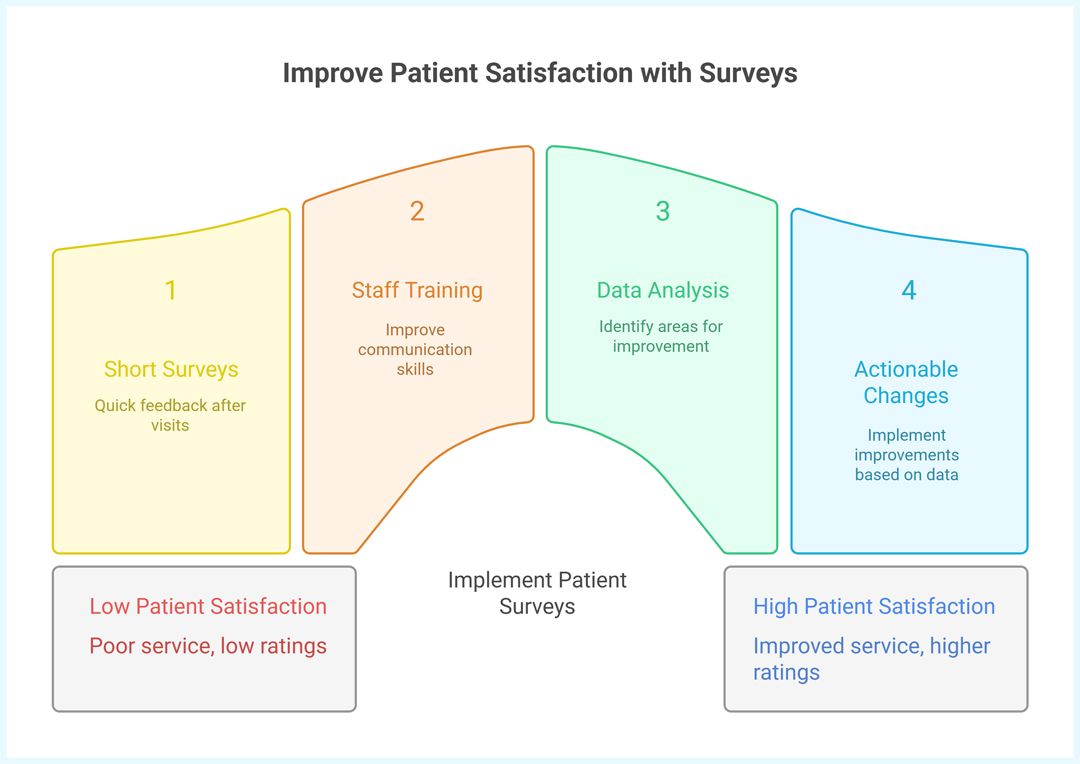
When a clinic runs short surveys after visits, patterns emerge fast: poor communication explains most low ratings, not treatment quality. That’s a fixable issue—train front-desk staff, adjust scripts, and follow up by phone.
Practical benefits
Early detection of weak points: catch long waits, billing confusion, or rushed consultations before complaints rise.
Trust and retention: patients who feel heard return and recommend.
Team feedback loop: results guide staff coaching and recognition.
Data for accreditation: survey metrics often support compliance with healthcare quality standards (e.g., JCI, ISO 9001).
Digital insight: online surveys make trends visible—average rating per department, satisfaction by time of day, etc.
Common pitfalls
Too long: more than 15 items kills response rates.
Vague scales: avoid “good/fair” without clear anchors.
No closure: asking but never acting erodes trust.
Lack of segmentation: mixing outpatients, inpatients, and visitors in one survey muddies results.
Tip: Use a brief, structured form and always share what changed because of the feedback—patients notice.

The real power of a patient satisfaction survey is actionability. Next, we’ll look at types and scenarios where different formats fit best.
Start your free patient satisfaction survey now
Types and Scenarios of Patient Satisfaction Surveys
Not every patient interaction needs the same depth. The right format depends on where and how care is delivered. Here are the main types and when to use them.
1. Clinic or Outpatient Survey
Short and focused—5 to 10 questions about waiting time, staff courtesy, and clarity of medical advice.
Use when: patients come for brief consultations or follow-ups.
Goal: spot workflow friction and front-desk bottlenecks.
2. Hospital Inpatient Survey
Longer and more structured, covering admissions, nursing care, meals, cleanliness, discharge, and continuity of care.
Use when: patients stay more than 24 hours.
Goal: monitor multi-department coordination and comfort.
3. Specialty-Specific Surveys
Targeted templates for dental, maternity, or rehabilitation services.
Use when: specialized procedures require tailored questions.
Goal: measure satisfaction around specific pain points (pain management, privacy, follow-up).
4. Patient’s Companion or Caregiver Survey
Sometimes the patient is too young, elderly, or in recovery.
Use when: family members witness the care process.
Goal: get a fuller picture of the environment and communication tone.
5. Online Post-Visit Feedback
Delivered via email, SMS, or patient portal after discharge.
Use when: you need quick, anonymous feedback at scale.
Goal: maintain ongoing dialogue and trend analysis across facilities.
Example: A maternity clinic rotates two survey types—short post-discharge and a 3-month follow-up—to see if advice on newborn care stuck. They discovered the follow-up calls improved perceived support by 20%.
Choose the type that matches patient flow and decision speed. Next, we’ll build a question table—ready to adapt in Porsline.
Suggested Questions for a Patient Satisfaction Survey
Below is a concise, ready-to-use set you can adapt per service line. Keep it under 12–15 items for higher completion.
Patient satisfaction survey: questions, types, and purposes. On mobile, each row becomes a card with labeled sections.
| Question | Type | Purpose |
|---|---|---|
| How easy was it to schedule your appointment? | (5-point Likert) | Gauge access and booking friction. |
| How would you rate your wait time before seeing the clinician? | (5-point Likert) | Identify queueing/bottlenecks. |
| Staff greeted me with courtesy and respect. | (5-point Likert) | Measure front-desk/service tone. |
| The clinician listened carefully to my concerns. | (5-point Likert) | Assess communication quality. |
| Explanations about my condition/treatment were clear. | (5-point Likert) | Check clarity and shared decisions. |
| I felt involved in decisions about my care. | (5-point Likert) | Capture autonomy/engagement. |
| The facility was clean and comfortable. | (5-point Likert) | Monitor environment standards. |
| It was easy to pay and understand the billing. | (5-point Likert) | Surface billing/checkout pain points. |
| How satisfied are you with the follow-up process? | (5-point Likert) | Evaluate continuity of care. |
| How likely are you to recommend our clinic/hospital to others? | NPS (0–10) | Track loyalty and referral potential. |
| What went well during your visit today? | Long text (open) | Capture strengths in the patient’s words. |
| What should we improve first? | Long text (open) | Prioritize the most actionable fix. |
| Did you visit for yourself or with/for someone (e.g., caregiver)? | Single choice | Enable segmentation (patient vs. companion). |
| Which department/service did you use? | Multiple choice | Segment satisfaction by service line. |
| Preferred contact for follow-up (optional) | Short text / Email / Phone | Enable service recovery when appropriate. |
Tip: If you serve pediatrics, maternity, or rehab, add 2–3 specialty items (privacy, pain control, discharge instructions) and keep total length ≤15 items.
This set balances comparability (Likert + NPS) with open text for priorities. Next, we’ll build it step-by-step in Porsline with logic, skip, and routing.
How to design the survey in Porsline (step by step)
A fast, clean setup beats a bloated form. Follow these focused steps to launch, learn, and iterate.
Before you start (1 minute)
Create an account or log in to Porsline. Choose one path:
Start from template: choose Create new survey →Pick a template → select Patient Satisfaction Survey Template → Use this template → customize.
Build from scratch: choose Create new survey → add fields → shape the flow with logic in your Survey Maker.
1) Start from the ready template
From your dashboard, create a new Survey and choose the Patient Satisfaction Survey Template.
Set form language to English and name it clearly (e.g., “Clinic A · Patient Satisfaction · Q4”).
2) Branding & theme (2 minutes)
Add your logo, choose a light background, and set readable contrasts.
Suggested palette for healthcare: Background #F0F5FA, Buttons #0F172A, Text #0F172A, Accents #475569.
Keep headings short; avoid all-caps.
3) Add the question set
Copy the items from the “Suggested Questions” table.
Keep the total under 12–15 questions; put open-text near the end to reduce drop-offs.
Use consistent 5-point Likert anchors (e.g., Very poor → Excellent).
4) Logic, skip, and smart routing
Set minimal, high-impact rules in your Survey Maker:
If “Which department/service did you use?” = Dental, then show 2 specialty items (e.g., pain control, privacy).
If “Did you visit for yourself or with/for someone?” = Caregiver, then show 2 caregiver items.
If NPS ≤ 6 or overall satisfaction ≤ Fair, then tag = “Service recovery” and notify team (see step 6).
Use page breaks to group: Access → Communication → Environment → Billing → Overall/NPS → Open text.
If Auto Satisfaction Index = Low ⇒ Tag = Service recovery + Notify (Quality Improvement/Nursing/Clinic owner).
Store Visit ID (from HIS) in a Custom Variables for faster follow-up.
5) Required fields & consent
Make only 1–2 fields required (e.g., department + overall rating).
Add a short privacy notice (example):
“Your feedback is confidential and used to improve care. Results are reported in aggregate. Do not include personal medical details.”If you need follow-up, make contact info optional and explain purpose.
6) Integrations: HIS & SMS
Connect Porsline with your HIS to pass visit/patient identifiers securely.
Enable SMS invitations post-visit with a short consent note.
Turn on auto satisfaction index; set rules to route low scores to Quality Improvement/Nursing or the clinic owner.
Log actions under the “Service recovery” label.
7) Notifications, labels, and collaboration
Create an email alert for low scores and tag as Service recovery.
When the auto index flags a low score, send an instant alert to Quality Improvement/Nursing (hospital) or the clinic owner.
Use labels per location/service line to speed filtering.
8) Share the survey
Enable link sharing post-visit via email/SMS or print QR codes for discharge desks.
For time-based cohorts, add unique UTM tags (e.g.,
utm_source=discharge_q4).
9) Dashboards & quick analysis
Track Top-box % (Excellent/Very good) for overall satisfaction.
Filter by department, time of day, and location to spot bottlenecks.
Review the “What should we improve first?” open-text weekly; cluster 3 recurring themes and assign owners.
10) Data hygiene & retention
Export monthly (CSV/XLSX) for backup and trend analysis.
Limit access to results to staff who need it. Document who sees what.
11) Iterate in short loops
Each month, retire 1–2 low-signal items and test one new, specific question.
Communicate back to patients: “You said X; we did Y.” It boosts response quality and trust.
Build lean by limiting questions to high-signal items, route smartly via your Survey Maker with targeted logic and segmentation, and close the loop with real-time alerts and performance dashboards that drive timely action.
A patient satisfaction survey template only works if it stays short, focused, and tied to action. Keep your question set lean, add smart routing for specialties, and review trends weekly so fixes are visible to patients and staff.
Ready to put this into practice?
Launch the Patient Satisfaction Survey Template in Porsline, customize it to your service lines, and track improvements with built-in dashboards and alerts.
Start Your Free Survey Trial on Porsline
FAQ — Patient Satisfaction Survey Template
What is a patient satisfaction survey template?
A ready structure of questions and scales you can copy, customize, and launch to measure perceptions of care (communication, wait time, clarity), then trend results by service line.
Where can I get a free patient satisfaction survey?
You can start from a free patient satisfaction survey in Porsline, then tailor items, add routing, and track top-box scores in dashboards.
What is a hospital patient satisfaction questionnaire used for?
A hospital patient satisfaction questionnaire covers admissions, nursing care, cleanliness, meals, discharge instructions, and coordination—ideal for multi-department monitoring.
Do you have an outpatient satisfaction survey template?
Yes—an outpatient satisfaction survey template focuses on booking ease, wait time, clinician communication, billing clarity, and overall rating/NPS in 10–12 items.
Any tips for a dental patient satisfaction survey template?
A dental patient satisfaction survey template should add pain control, privacy, clarity of procedure risks, and post-visit instructions—kept brief to protect completion rates.
What should patient satisfaction survey questions include?
Core patient satisfaction survey questions: access/booking, wait time, staff courtesy, clinician listening, clarity of explanations, environment, billing, overall rating/NPS, and one open “What should we improve first?”
How to create a patient satisfaction survey that drives action?
Start small (≤15 items), use consistent 5-point anchors, segment by service line, set alerts for low scores, and review trends monthly. That’s how to create a patient satisfaction survey that leads to visible fixes.
Is there a HIPAA-compliant patient survey tool?
Porsline supports privacy-first setups; use minimal PII, restrict access, and export aggregated results. For U.S. providers, verify policies/process controls to run a HIPAA-compliant patient survey tool workflow.
Patient experience survey vs patient satisfaction—what’s the difference?
Patient experience documents what happened (e.g., “Was discharge info explained?”). Patient satisfaction asks if expectations were met. Use both for a full picture.
Can we integrate patient satisfaction survey with our Hospital Information System (HIS)?
Yes. Connect Porsline to pass visit IDs securely, trigger SMS invites, and auto-calculate satisfaction for routing.
How are dissatisfied cases handled?
Low scores are auto-flagged and routed to Quality Improvement/Nursing (hospital) or the clinic owner for timely service recovery.